Checking and Cancelling Copy Jobs
You can check the details of copy jobs. Also, you can cancel copy jobs while the jobs are in process.
|
NOTE
|
||||
If the Processing/Data indicator on the operation panel is:
|
Cancelling a Copy Job Using [ ] (Stop)
1
Press [] (Stop).
] (Stop).
 |
If only one job is processing or waiting, you can stop the job by pressing [
] (Stop) twice. |
2
When multiple jobs are being processed, press [ ] or [
 ] to highlight a job to be cancelled, and then press [OK].
] or [] to highlight a job to be cancelled, and then press [OK].3
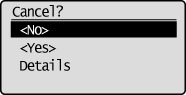
When <Cancel?> appears, press [] or [] to highlight <Yes>, and then press [OK].
] or [] to highlight <Yes>, and then press [OK].You can cancel the print job also by pressing [] (Stop).
] (Stop).The job is cancelled.
|
|
To check the details of the job you want to cancel, press [
] or [] to highlight <Details>, and then press [OK]. |
Checking and Cancelling a Copy Job Using [ ] (Status Monitor)
1
Press [] (Status Monitor).
] (Status Monitor).2
Press [] or [] to highlight <Copy/Print Job>, and then press [OK].
] or [] to highlight <Copy/Print Job>, and then press [OK].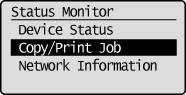
3
Press [] or [] to highlight <Job Status>, and then press [OK].
] or [] to highlight <Job Status>, and then press [OK].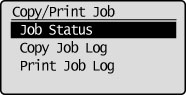
Copy/Print Job Status is displayed.
4
Press [] or [] to highlight <Copying>, and then press [OK].
] or [] to highlight <Copying>, and then press [OK].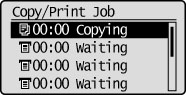
The detailed information is displayed.
To cancel the job:
|
(1)
|
Press [
] or [] to highlight <Cancel>, and then press [OK].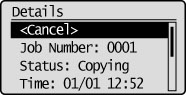 |
|
|
(2)
|
Press [
 ] to highlight <Yes>, and then press [OK]. ] to highlight <Yes>, and then press [OK].The job is cancelled.
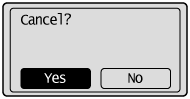 |
|
|
(3)
|
Press [
] (Status Monitor) to close the screen. |
To check the Job Number:
Press [] or [] to highlight <Job Number>, and then press [OK].
] or [] to highlight <Job Number>, and then press [OK].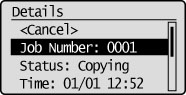
The Job Number is displayed.
To only check the details of the selected job:
After you finish checking the details of the selected job, press [] (Status Monitor) to close the screen.
] (Status Monitor) to close the screen.