Copying 1-Sided Document to 2-Sided
Copy a 1-sided document onto both sides of the output.
|
NOTE
|
|
This function can only be used when the optional Duplex Unit-C1 is attached.
|
1
Place documents.
2
Display the Copy mode screen.
Press [ ] (COPY/SCAN) to switch to the Copy mode screen.
] (COPY/SCAN) to switch to the Copy mode screen.3
Press [ ] (2-Sided).
] (2-Sided). 4
Press [ ] or [
 ] to highlight <1->2-Sided>, and press [OK].
] or [] to highlight <1->2-Sided>, and press [OK].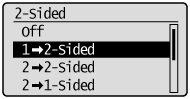
To specify the 2-Sided copy format:
|
(1)
|
Press [
] or [] to highlight <Original/Finishing Type>, and press [OK].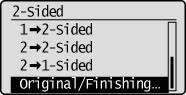 |
|
(2)
|
Press [
] or [] to highlight <1->2-Sided>, and press [OK].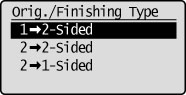 |
|
(3)
|
Press [
] or [] to highlight how to open the output, and then press [OK].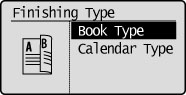 |
5
Press [ ] (Start).
] (Start).To copy a document by placing in the feeder:
Copying starts.
To copy a document by placing on the platen glass:
Perform the following procedure.
|
(1)
|
Press [
] or [] to highlight the size of the original document, and then press [OK].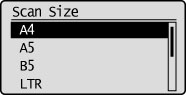 |
||
|
(2)
|
Place the next page and press [
] (Start).
|
||
|
(3)
|
Press [
] or [] to highlight <Finish Scanning>, and then press [OK].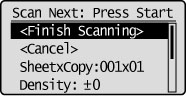 |