 ] (COPY/SCAN) to switch to the Copy mode screen.
Making Erase Frame Copies
Making Original Frame Copies
1
Place documents.
2
Display the Copy mode screen.
Press [] (COPY/SCAN) to switch to the Copy mode screen.
] (COPY/SCAN) to switch to the Copy mode screen.3
Press [ ] or [
 ] to highlight <Erase Frame: Off>, and then press [OK].
] or [] to highlight <Erase Frame: Off>, and then press [OK].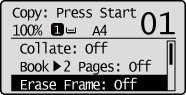
If you want to make Original Frame copies with the default setting:
Press [] or [] to highlight <Original Frame>, and then press [OK].
] or [] to highlight <Original Frame>, and then press [OK].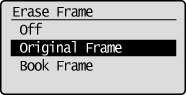
Press [] or [] to set the Outer Frame Width, and then press [OK].
] or [] to set the Outer Frame Width, and then press [OK].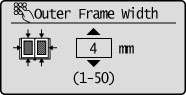
|
NOTE
|
|
You can set the erase width from 1 mm to 50 mm.
The default setting is 4 mm.
|
4
Press [] or [] to select the original size, and then press [OK].
] or [] to select the original size, and then press [OK].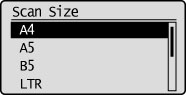
5
Press  (Start).
(Start).Making Book Frame Copies
1
Place documents.
2
Display the Copy mode screen.
Press [] (COPY/SCAN) to switch to the Copy mode screen.
] (COPY/SCAN) to switch to the Copy mode screen.3
Press [] or [] to highlight <Erase Frame: Off>, and then press [OK].
] or [] to highlight <Erase Frame: Off>, and then press [OK].If you want to make Book Frame copies with the default setting.
Press [] or [] to select <Book Frame>, and then press [OK].
] or [] to select <Book Frame>, and then press [OK].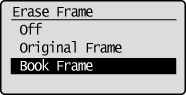
Press [] or [] to set the Center Frame Width, and then press [OK].
] or [] to set the Center Frame Width, and then press [OK].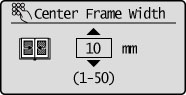
|
NOTE
|
|
You can set the erase width from 1 mm to 50 mm.
The default setting is 10 mm.
|
Press [] or [] to set the Outer Frame Width, and then press [OK].
] or [] to set the Outer Frame Width, and then press [OK].|
NOTE
|
|
You can set the erase width from 1 mm to 50 mm.
The default setting is 4 mm.
|
4
Press [] or [] to select the book size when it is open, and then press [OK].
] or [] to select the book size when it is open, and then press [OK].5
Press (Start).
(Start).