 ] (COPY/SCAN) to switch to the Copy mode screen.
Recalling Favorite Settings
1
Display the Copy mode screen.
Press [] (COPY/SCAN) to switch to the Copy mode screen.
] (COPY/SCAN) to switch to the Copy mode screen.2
Press [ ] (ID Card Copy/Favorite Settings).
] (ID Card Copy/Favorite Settings).Press [ ] or [
 ] to highlight <Favorite Settings>, and then press [OK].
] or [] to highlight <Favorite Settings>, and then press [OK].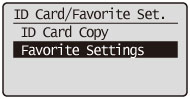
You can also display the Favorite Settings screen with the following procedure:
Display the Copy mode screen.
Press [] (COPY/SCAN) to switch to the Copy mode screen.
] (COPY/SCAN) to switch to the Copy mode screen.Press [] or [] to highlight <Favorite Settings>, and then press [OK].
] or [] to highlight <Favorite Settings>, and then press [OK].3
Press [] or [] to highlight a mode between <Mode 1> and <Mode 4>, and then press [OK].
] or [] to highlight a mode between <Mode 1> and <Mode 4>, and then press [OK].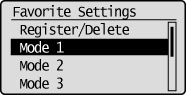
|
NOTE
|
|
You can customize the recalled Copy mode and use it to copy.
|
4
Press [](ID Card Copy/Favorite Settings).
](ID Card Copy/Favorite Settings).