Enabling Auto Recognize Original Orientation
Automatically rotate images by calculating original size/copy ratio/etc, and print them on paper loaded in the paper source.
1
Press [ ] (Settings/Registration).
] (Settings/Registration).2
Press [ ] or [
 ] to highlight <Copy Settings>, and then press [OK].
] or [] to highlight <Copy Settings>, and then press [OK].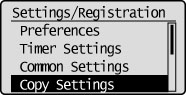
3
Press [] or [] to highlight <Auto Recognize Original Orientation>, and then press [OK].
] or [] to highlight <Auto Recognize Original Orientation>, and then press [OK].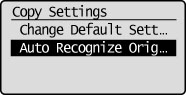
4
Press [] or [] to highlight <On>, and then press [OK].
] or [] to highlight <On>, and then press [OK].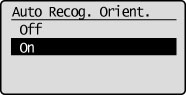
|
NOTE
|
|
When enlarging and copying A4, B5, or A5 originals onto A3 or B4 paper, even if Auto Recognize Original Orientation is set to <On> the images will not be rotated.
Only the images of standard size originals up to A4 size can be rotated when the copy ratio is set to 100%.
If automatic paper selection is set, even if the most appropriate paper is unavailable, as long as paper of the same size is available (even if the orientation is different) it will be displayed as the most appropriate paper.
|