Automatic Feeder Cleaning
If your originals have black streaks or appear dirty after scanning them through the feeder, perform an automatic feeder cleaning for the rollers of the feeder.
This procedure is necessary only when the optional feeder (DADF-AM1) is attached.
1
Press [ ] (Settings/Registration).
] (Settings/Registration).2
Press [ ] or [
 ] to highlight <Adjustment/Maintenance>, and then press [OK].
] or [] to highlight <Adjustment/Maintenance>, and then press [OK].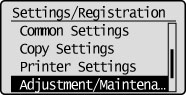
3
Press [] or [] to highlight <Clean Feeder>, and then press [OK].
] or [] to highlight <Clean Feeder>, and then press [OK].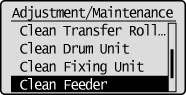
 If the cleaning does not start: If the cleaning does not start: |
|
You cannot use this function when jobs are stored in memory.
|
4
Load 10 sheets of blank paper in the feeder, and then press [OK].
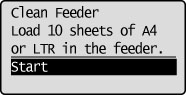
 We recommend that you load plain paper when cleaning the feeder.
5
Press [] (Settings/Registration) to close the Settings/Registration screen.
] (Settings/Registration) to close the Settings/Registration screen.