Using the Toner Save Mode
You can specify whether to conserve the amount of toner used for copying.
|
NOTE
|
To conserve the amount of toner used for printing:Enable [Toner Save] in the [Quality] tab of the printer driver.
|
1
Press [ ] (Settings/Registration).
] (Settings/Registration).2
Press [ ] or [
 ] to highlight <Adjustment/Maintenance>, and then press [OK].
] or [] to highlight <Adjustment/Maintenance>, and then press [OK].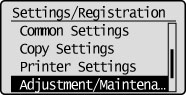
3
Press [] or [] to highlight <Toner Save>, and then press [OK].
] or [] to highlight <Toner Save>, and then press [OK].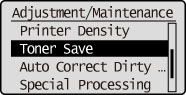
4
Press [OK].

5
Press [] or [] to highlight <Off>,<Low Save Mode> or <High Save Mode>, and then press [OK].
] or [] to highlight <Off>,<Low Save Mode> or <High Save Mode>, and then press [OK].
|
<Off>
|
Do not use the Toner Save mode.
|
|
<Low Save Mode>
|
Set toner conservation to a low level.
|
|
<High Save Mode>
|
Set toner conservation to a high level.
|
6
Press [] (Settings/Registration) to close the Settings/Registration screen.
] (Settings/Registration) to close the Settings/Registration screen.