Automatically Correcting Streaks Caused by Dirt on the Scanning Area
When dirt on the scanning area causes output paper to have streaks, you can automatically correct this.
|
NOTE
|
|
This feature can only be used when the optional feeder (DADF-AM1) is attached.
While some dots or lines may continue to be printed when this setting is set to <On>, copies are significantly clearer than when it is set to <Off>.
|
1
Press [ ] (Settings/Registration).
] (Settings/Registration).2
Press [ ] or [
 ] to highlight <Adjustment/Maintenance>, and then press [OK].
] or [] to highlight <Adjustment/Maintenance>, and then press [OK].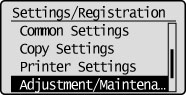
3
Press [] or [] to highlight <Auto Correct Dirty Scanning Area>, and then press [OK].
] or [] to highlight <Auto Correct Dirty Scanning Area>, and then press [OK].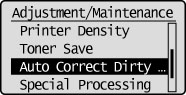
4
Press [] or [] to highlight <Off> or <On>, and then press [OK].
] or [] to highlight <Off> or <On>, and then press [OK].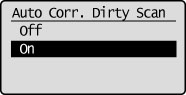
5
Press [] (Settings/Registration) to close the Settings/Registration screen.
] (Settings/Registration) to close the Settings/Registration screen.