Setting the Current Date and Time
This section describes how to set the current date and time, and the date and time display formats.
The specified date and time are used for each report.
1
Press [ ] (Settings/Registration).
] (Settings/Registration).2
Press [ ] or [
 ] to highlight <Timer Settings>, and then press [OK].
] or [] to highlight <Timer Settings>, and then press [OK].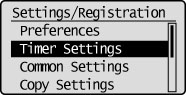
3
Press [] or [] to highlight <Date/Time Settings>, and then press [OK].
] or [] to highlight <Date/Time Settings>, and then press [OK].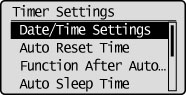
4
Press [] or [] to highlight the desired setting, and then press [OK].
] or [] to highlight the desired setting, and then press [OK].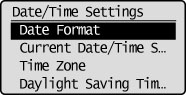
|
Settings
|
Purpose
|
Procedure
|
||||||
|
<Date Format>
|
Specify the date display format.
|
Press [
] or [] to highlight a date format, and then press [OK].The date formats include the following: YYYY MM/DD
MM/DD/YYYY
DD/MM YYYY
|
||||||
|
<Current Date/Time Settings>
|
Specify the current time and date.
|
Press [
 ] or [ ] or [ ] to move the cursor, press [] or [] to select numbers to enter the date and time, and then press [OK]. ] to move the cursor, press [] or [] to select numbers to enter the date and time, and then press [OK].You can also enter values using the numeric keys.
|
||||||
|
<Time Zone>
|
Set the time zone.
|
press [
] or [] to select time zone, and then press [OK]. |
||||||
|
<Daylight Saving Time Settings>*
|
Specify whether to use daylight saving time.
|
To specify daylight savings time:
|
|
*
|
This setting may be unavailable depending on the country where you are using the machine.
|
5
Press [] (Settings/Registration) to close the Settings/Registration screen.
] (Settings/Registration) to close the Settings/Registration screen.