Specifying the Screen that Is Displayed after Auto Reset Is Performed
Specify whether to return to the Copy mode screen or stay on the same screen when the auto reset mode activates.
1
Press [ ] (Settings/Registration).
] (Settings/Registration).2
Press [ ] or [
 ] to highlight <Timer Settings>, and press [OK].
] or [] to highlight <Timer Settings>, and press [OK].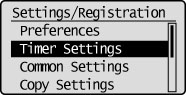
3
Press [] or [] to highlight <Function After Auto Reset>, and press [OK].
] or [] to highlight <Function After Auto Reset>, and press [OK].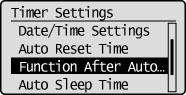
4
Press [] or [] to <Default Function> or <Selected Function>, and press [OK].
] or [] to <Default Function> or <Selected Function>, and press [OK].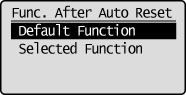
|
<Default Function>
|
Returns to the Copy mode screen when the auto reset mode activates.
|
|
<Selected Function>
|
Stays on the same screen when the auto reset mode activates.
|
5
Press [] (Settings/Registration) to close the Settings/Registration screen.
] (Settings/Registration) to close the Settings/Registration screen.