Registering/Editing Purchase Information for Consumables
You can scan and register/edit the documentation of your local authorized Canon dealer (business card, information, etc.).
|
NOTE
|
|
Documentation sizes that can be registered are as follows:
Short side: 139.7 mm, long side: 195.0 mm
The documentation will be stored as a 600 x 600 dpi image.
To set the density for scanning the documentation of your local authorized Canon dealer (business card, information, etc.), set the density on the Copy mode screen before pressing [
 ] (Settings/Registration). ] (Settings/Registration). |
1
Press [] (Settings/Registration).
] (Settings/Registration).2
Press [ ] or [
 ] to highlight <Output Reports>, and then press [OK].
] or [] to highlight <Output Reports>, and then press [OK].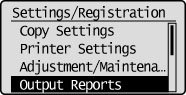
3
Press [] or [] to highlight <Purchase Information for Consumables>, and then press [OK].
] or [] to highlight <Purchase Information for Consumables>, and then press [OK].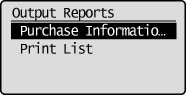
4
Press [] or [] to highlight <Register/Edit Purchase Information>, and then press [OK].
] or [] to highlight <Register/Edit Purchase Information>, and then press [OK].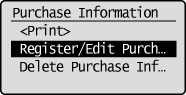
5
If <Register business card of service rep. for consumables?> is displayed, press [ ] to highlight <Yes>, and then press [OK].
] to highlight <Yes>, and then press [OK].If the documentation is already registered, a confirmation screen for overwriting the existing data is displayed.
6
Place the documentation on the platen glass, and then close the feeder (DADF-AM1) or platen cover.
Press [ ] (Start) to register the documentation.
] (Start) to register the documentation.If a message indicating that there is insufficient memory is displayed, set a lower density on the Copy mode screen or make the business card or other original on the platen glass smaller.
7
Press [] (Settings/Registration) to close the Settings/Registration screen.
] (Settings/Registration) to close the Settings/Registration screen.