Cleaning the Fixing Unit
You should clean the fixing unit when:
Black streaks appear on the output
You replace the toner cartridge
1
Press [ ] (Settings/Registration).
] (Settings/Registration).2
Press [ ] or [
 ] to highlight <Adjustment/Maintenance>, and then press [OK].
] or [] to highlight <Adjustment/Maintenance>, and then press [OK].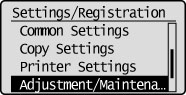
3
Press [] or [] to highlight <Clean Fixing Unit>, and then press [OK].
] or [] to highlight <Clean Fixing Unit>, and then press [OK].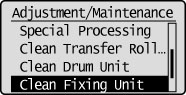
4
Check if the supported paper is set in the multi-purpose tray, and then press [OK].
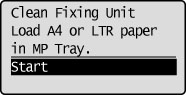
 |
We recommend that you load plain paper when cleaning the fixing unit.
|
 If the cleaning does not start: If the cleaning does not start: |
|
You cannot use this function when jobs are stored in memory.
|
5
Confirm the displayed screen, and then press [OK].
A sheet for cleaning the fixing unit is printed.
Follow the instructions on the screen to place the sheet for cleaning with the side to be printed face up in the multi-purpose tray, and then press [OK].
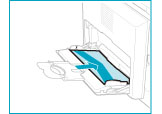
The cleaning begins. It takes approximately 90 seconds to complete the process.
6
Press [] (Settings/Registration) to close the Settings/Registration screen.
] (Settings/Registration) to close the Settings/Registration screen.