 ] (Status Monitor) to display the Status Monitor screen. From here, you can check, change, etc. the status of error information, the device status, and copy/print jobs.
Overview of This Function
Press [] (Status Monitor) to display the Status Monitor screen. From here, you can check, change, etc. the status of error information, the device status, and copy/print jobs.
] (Status Monitor) to display the Status Monitor screen. From here, you can check, change, etc. the status of error information, the device status, and copy/print jobs.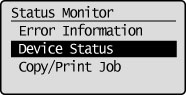
In [Error Information], you can check the status of any errors and see information on how to fix them.
In [Device Status], you can check the amount of paper remaining loaded in a drawer, and the amount of toner remaining.
In [Copy/Print Job], you can perform operations such as cancel jobs and check job details.
|
NOTE
|
||
|
The number of jobs displayed for the job log is indicated below.
|
|
IMPORTANT
|
|
If [Display Job Log] in [System Management Settings] (Settings/Registration) is set to <Off>, Log for each screen is not displayed.
|