Registering the Machine Name and Location(imageRUNNER 2202N/2002N Only)
1
Press [ ] (Settings/Registration).
] (Settings/Registration).2
Press [ ] or [
 ] to highlight <System Management Settings>, and then press [OK].
] or [] to highlight <System Management Settings>, and then press [OK].If System Manager Information Settings are specified:
Use the numeric keys to enter the System Manager ID and PIN, and then press [OK].
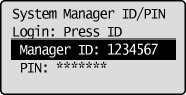
Press  (Log In/Out).
(Log In/Out).3
Press [] or [] to highlight <Device Information Settings>, and then press [OK].
] or [] to highlight <Device Information Settings>, and then press [OK].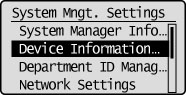
4
Press [] or [] to highlight <Device Name>, and then press [OK].
] or [] to highlight <Device Name>, and then press [OK].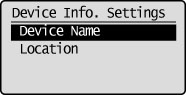
5
Enter the name of the machine.
When you are finished entering, press [] or [] to highlight <Apply>, and then press [OK].
] or [] to highlight <Apply>, and then press [OK].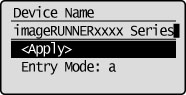
6
Press [] or [] to highlight <Location>, and then press [OK].
] or [] to highlight <Location>, and then press [OK].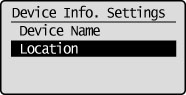
7
Enter the machine location.
When you are finished entering, press [] or [] to highlight <Apply>, and then press [OK].
] or [] to highlight <Apply>, and then press [OK].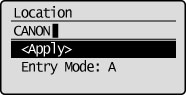
8
Press [] (Settings/Registration) to close the Settings/Registration screen.
] (Settings/Registration) to close the Settings/Registration screen.