Registering Destinations in the One-Touch Keys
You can register frequently used destinations in 19 one-touch keys on the operation panel (Operation Panel).
1
Press  or
or  .
.
or .If a logon screen appears, see Logging on to Authorized Send.
2
Press  (Address Book).
(Address Book).3
Use  /
/ to select <
 >.
>.
/ to select <>.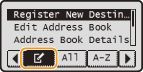
4
Use  /
/ to select <Register New Destination to Address Book>, and press
  .
.
/ to select <Register New Destination to Address Book>, and press .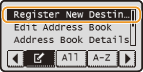
If a screen appears prompting you to enter a PIN, enter the correct PIN using the numeric keys, and press . Setting a PIN for Address Book
. Setting a PIN for Address Book5
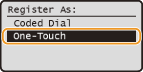
Select <One-Touch>, and press .
.
6
Select <Fax> or <E-Mail>, and press .
.
Select <Fax> when registering a fax number, or select <E-Mail> when registering an e-mail address.
The types of destinations that can be selected vary depending on the machine model.
7
Select the one-touch number to register the destination in, and press .
.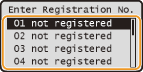
The number that you select in this step corresponds to the number of the one-touch key on the operation panel. Operation Panel
 Registering destinations with the LDAP server
NOTE:
If your office has an LDAP server installed, you can register destinations searched from the server in the Address Book. You need to specify the settings for connecting to an LDAP server beforehand. Registering LDAP Servers
|
1
|
Select <Specify from LDAP Server>, and press
. |
|
2
|
Search for the destination to register.
See steps 3 to 8 on Specifying Destinations in an LDAP Server (Fax) for the procedure.
According to the content registered in the LDAP server, the user name and the fax number/e-mail address of the specified destination that is registered on the LDAP server will be automatically input.
|
|
3
|
Select a destination, and press
. |
|
4
|
Proceed to step 12.
|
8
Select <Name>, and press .
.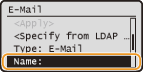
Registering <Name> is optional. If you register <Name>, the destination can be searched alphabetically.
9
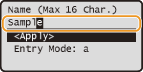
Enter the name using the numeric keys, select <Apply>, and press .
.
10
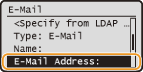
Select <Fax Number> or <E-Mail Address>, and press .
.
11
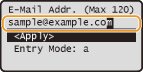
Enter the number or address using the numeric keys, select <Apply>, and press .
.
12
Select <Apply>, and press .
.Editing the Content of Registered Destinations
After registering destinations, you can change the content of destinations such as numbers, names, types, and one-touch numbers.
1
Press or .
or .If a logon screen appears, see Logging on to Authorized Send.
2
Press (Address Book).
(Address Book).3
Use / to select <>.
/ to select <>.4
Use /to select <Edit Address Book>, and press .
/to select <Edit Address Book>, and press .If a screen appears prompting you to enter a PIN, enter the correct PIN using the numeric keys, and press . Setting a PIN for Address Book
. Setting a PIN for Address Book5
Select < >.
>.
>.6
Select the destination you want to edit, and press .
.7
Select the item you want to edit, press , and then perform editing.
, and then perform editing.8
Select <Apply>, and press .
.Deleting a Registered Destination
1
Press or .
or .If a logon screen appears, see Logging on to Authorized Send.
2
Press (Address Book).
(Address Book).3
Use / to select <>.
/ to select <>.4
Use /to select <Delete From Address Book>, and press .
/to select <Delete From Address Book>, and press .If a screen appears prompting you to enter a PIN, enter the correct PIN using the numeric keys, and press . Setting a PIN for Address Book
. Setting a PIN for Address Book5
Select <>.
>.6
Select the destination you want to delete, and press .
.7
Select <Yes>, and press .
.