Importing Registered Data from a USB Memory Device
Data that was exported to a USB memory device can be imported to the machine. For more information about the settings that cannot be imported, see Exporting/Importing Registered Data.
|
IMPORTANT
|
|
The existing menu options data is overwritten when you import the data.
|
1
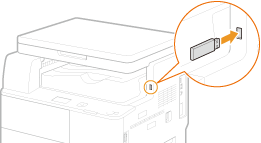
Connect a USB memory device to the USB memory port.
IMPORTANT:
The USB port on the right side of the machine toward the rear is not available.
Do not disconnect, jostle, or turn OFF the machine or USB memory device while the data is being transferred.
2
Press  .
.
.3
Use  /
/ to select <System Management Settings>, and press
  .
.
/ to select <System Management Settings>, and press .If the logon screen appears, enter the correct ID and PIN using the numeric keys, and then press  . Logging on to the Machine
. Logging on to the Machine4
Select <Import/Export of Settings>  <Import>.
<Import>.5
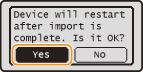
Select <Yes>, and press .
.
6
Enter the password, select <Apply>, and press .
.Enter the password that was set when exporting the data (Exporting Registered Data to a USB Memory Device).
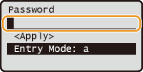
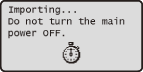
Importing starts. The machine restarts automatically after the data is imported.
7
Disconnect the USB memory device after the machine restarts.
See step 7 in Exporting Registered Data to a USB Memory Device for the procedure.