Canceling Copies
If you want to cancel copying immediately after pressing  , press
  on the operation panel. You can also cancel copying after checking the copy status.
, press on the operation panel. You can also cancel copying after checking the copy status.Press to cancel
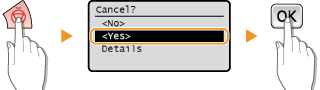 |
You can also cancel copying by selecting <Cancel> on the screen. Select <Cancel> 
 <Yes> .
<Yes> .Use  (Status Monitor) to cancel
(Status Monitor) <Copy/Print Job> <Job Status> Select the copy document on the <Copy/Print Job Status> screen <Cancel> <Yes>
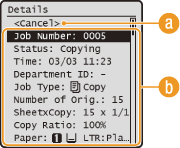 |
 <Cancel>
Cancels copying.
 Copy details
The number of copies, settings, and other details are displayed. If you only want to check the details without canceling copying, press (Status Monitor) to return to the copy main screen.
(Status Monitor) to return to the copy main screen.