Registering Frequently Used Copy Settings
You can register up to four frequently used combinations of copy settings. You can recall the registered setting combination when it is needed.
Select <Favorite Settings>
 Select <Register/Delete> Select <Settings 1> to <Settings 4> Select each setting and set the value <Apply> <Yes>
Select <Register/Delete> Select <Settings 1> to <Settings 4> Select each setting and set the value <Apply> <Yes> 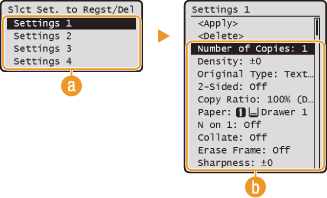
 <Settings 1> to <Settings 4>
Register frequently used combinations of copy settings as one of the favorite settings.
 Settings
Configure your frequently used settings. Various Copy Settings
|
NOTE
|
|
If you want to edit a registered setting, select <Favorite Settings>
<Register/Delete> select the setting edit the setting <Apply> <Yes> .If you want to delete a registered setting, select <Favorite Settings>
<Register/Delete> select the setting <Delete> <Yes> .Registered settings are saved even when the machine is turned OFF.
|
Using a Registered Setting
To use a registered setting, select <Favorite Settings> select the setting to recall . You can change the settings in a setting combination after it is recalled.
select the setting to recall . You can change the settings in a setting combination after it is recalled.