Initializing System Management Settings
You can restore the <Display Job Log> setting in <System Management Settings> to the factory default (Setting Menu List).
1
Press  .
.
.2
Use  /
/ to select <System Management Settings>, and press
  .
.
/ to select <System Management Settings>, and press .3
Select <Initialize Menu>  <System Management Settings>.
<System Management Settings>.4
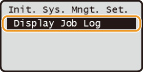
Select <Display Job Log>, and press .
.
5
Select <Yes>, and press .
.
6
Restart the machine.
Turn OFF the machine, wait for at least 10 seconds, and turn it back ON.