Printing Results Are Not Satisfactory
Dirt inside the machine may affect printing results. Perform care and cleaning to the machine first.
Cleaning the Machine
Cleaning the Machine
Streaks Appear on Printouts

 Are you using appropriate paper?
Check usable paper, and replace with appropriate paper.
White Streaks Appear

Is toner running low?
Check how much toner is left, and replace the toner cartridge as necessary.
Is the platen glass dirty?
Clean the platen glass or the bottom of the feeder.
Toner Smudges and Splatters Appear

Are you using appropriate paper?
Check usable paper, and replace with appropriate paper.
Is toner running low?
Check how much toner is left, and replace the toner cartridge as necessary.
Printouts Are Faded

Is toner running low?
Check how much toner is left, and replace the toner cartridge as necessary.
Are you using appropriate paper?
Check usable paper, and replace with appropriate paper. Also, specify the paper size and type settings properly.
Print Density Is Uneven

Is toner running low?
Check how much toner is left, and replace the toner cartridge as necessary.
Printouts Are Grayish
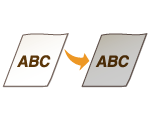
Is toner running low?
Check how much toner is left, and replace the toner cartridge as necessary.