Delivery/Reverse Unit
This section describes how to clear a paper jam which occurs in the delivery/reverse unit. The location of the delivery/reverse unit is indicated in the following illustration.

NOTE |
The following illustration indicates the location of the paper jam. Please refer to it to remove the jammed paper.  |
Follow the procedure described below, while referring to the location of the paper jam and the directions that appear on the touch panel display, to remove the jammed paper.
1.
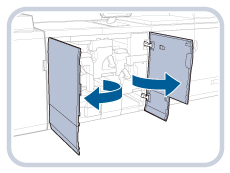
Open the front cover of the fixing station.
Open the right side of the front cover first.
2.
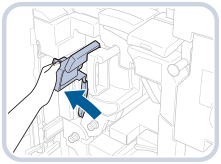
Grip the guide (C-C1), and open it.
 CAUTION CAUTION |
When opening the guide, be careful not to get your fingers caught, as this may result in personal injury. |
3.
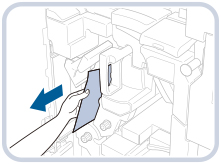
Remove any jammed paper.
4.
Turn the dial (C-C3) in the direction of the arrow (counterclockwise).

5.
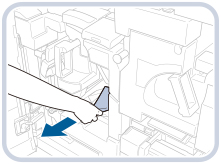
Remove any jammed paper.

NOTE |
If there are multiple sheets of jammed paper, get the paper together, and then pull out the paper as shown in the illustration below. 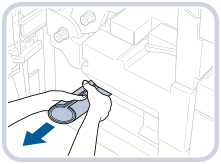 |
6.
Close the guide (C-C1).

Close the guide (C-C2) at the same time.
7.
Open the guide (C-D1).

| CAUTION |
When opening the guide, be careful not to get your fingers caught, as this may result in personal injury. |
8.
Remove any jammed paper.
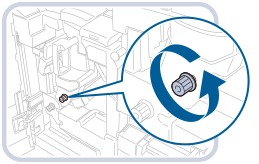
9.
Turn the dial (C-D2) in the direction of the arrow (counterclockwise).
10.
Remove any jammed paper.
11.
Lift up the guide (C-D1), and close it.

12.
Pull up the lever (C-D3).

13.
Pull out the delivery/reverse unit until it stops.

14.
Lift up the guide (C-D4), and remove any jammed paper.

15.
Close the delivery/reverse unit until it clicks into place.

16.
Return the lever (C-D3) to its original position.

17.
Open the guide (C-E).

18.
Remove any jammed paper.

19.
Close the guide (C-E) until it clicks into place.

| CAUTION |
When closing the guide, be careful not to get your fingers caught, as this may result in personal injury. |
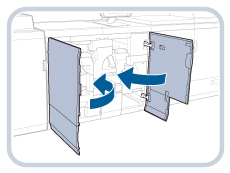
20.
Close the front cover of the fixing station.
Close the left side of the front cover first.
21.
Follow the instructions on the touch panel display.
NOTE |
The screen indicating the directions on how to clear the paper jam is displayed repeatedly until the paper jam is cleared. (See "Clearing Paper Jams.") |