Name and function of each Status Monitor part
Status Monitor is an application software that is interlocked with the printer operation.
The printer status can be confirmed on the computer by using Status Monitor.
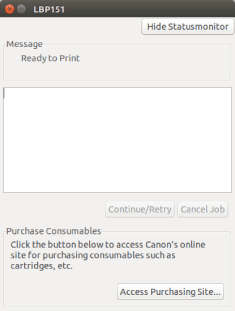
Menu bar | |
[Job] | Executes operations such as restart and cancel. |
[Options] | To clean the printer. |
[Hide Statusmonitor] | The Status Monitor will be set to a non-displayed status by clicking this button and will appear only when an error occurs while printing. |
Message Area | A message on the printer status is displayed in the message area and auxiliary message area. |
[Continue/Retry] | Restarts a print operation when clicked. |
[Cancel Job] | Cancels a print operation when clicked. |
[Access Purchasing Site] | (Only for LBP151dw) Displays the page for purchasing consumables. |