Finished Stamp
The machine can print a stamp (approximately 1/8" (3 mm) in diameter) on the front side of scanned and sent originals.
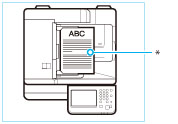
Vertical Placement
* Position at which stamp is applied
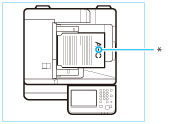
Horizontal Placement
* Position at which stamp is applied
|
IMPORTANT
|
|
Place your originals in the feeder. The finished stamp is applied to originals that are scanned from the feeder.
|
1.
Press [Scan and Send].

2.
Specify the destination → press [Options] → [Finished Stamp].
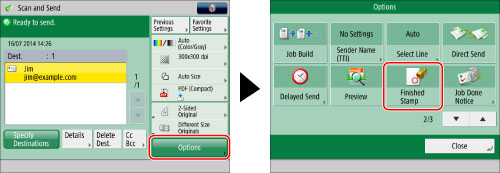
3.
Press [Close].
|
NOTE
|
|
If the stamp does not print correctly, see "Replacement Parts."
|