Confirming the Department ID and Password
You can confirm the Department ID and password when printing using a driver that supports Windows Vista/7.
|
IMPORTANT
|
|
Changes made to Confirm Dept. ID Management Password become effective when the machine is restarted. To restart the machine, turn it OFF, wait at least 10 seconds, and then turn it ON. For instructions on how to turn the machine ON and OFF, see Chapter 2, “Before You Start Using the Machine,” in the User’s Guide.
|
|
NOTE
|
|
The default setting is ‘On’.
|
1
Press  (Additional Functions) → [System Settings] → [Network Settings].
(Additional Functions) → [System Settings] → [Network Settings].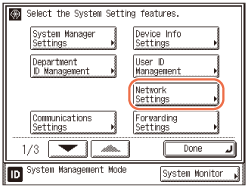
2
Press [TCP/IP Settings].
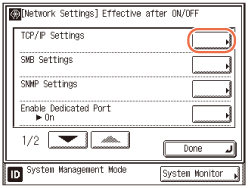
3
Press [ ] or [
 ] until [Confirm Dept. ID Management Password] appears → press [Confirm Dept. ID Management Password].
] or [] until [Confirm Dept. ID Management Password] appears → press [Confirm Dept. ID Management Password].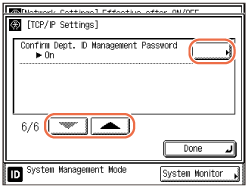
4
Press [On] or [Off] → [OK].
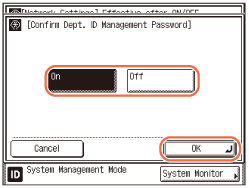
[On]: Confirms the Department ID and password when printing using a driver that supports Windows Vista/7.
[Off]: Does not confirm the Department ID and password when printing using a driver that supports Windows Vista/7.
5
Restart the machine.
Turn OFF the machine, wait at least 10 seconds, and then turn it ON.