Restricting the Display of Job Log
You can specify whether or not to display the job log on the touch panel display. When you set [Job Log Display] to ‘On’, you can check the job log using the System Monitor screen. When you set [Job Log Display] to ‘Off’, the job log does not appear on the System Monitor screen.
|
NOTE
|
|
For more information on the System Monitor screen, see Basic Operations and Checking / Changing the Status of Documents in Memory.
When you set [Job Log Display] to ‘Off’, [Activity Reports] and [Fax Activity Reports] in Settings in Report Settings (from the Additional Functions screen) are not displayed.
When you set [Job Log Display] to ‘Off’, Activity Reports and Fax Activity Reports will not be printed automatically.
The default setting is ‘On’.
|
1
Press  (Additional Functions) → [System Settings].
(Additional Functions) → [System Settings].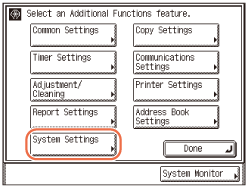
2
Press [ ] or [
 ] until [Job Log Display] appears → press [Job Log Display].
] or [] until [Job Log Display] appears → press [Job Log Display].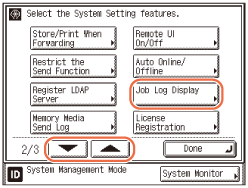
3
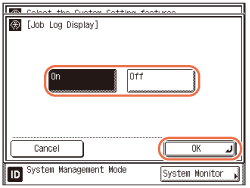
Press [On] or [Off] → press [OK].
|
|
[On]:
|
The job log is displayed on the System Monitor screen.
|
|
[Off]:
|
The job log is not displayed on the System Monitor screen.
|
4
Press  (Reset) to return to the top screen.
(Reset) to return to the top screen.