Displaying the Current Department ID / User Name
You can set whether or not to display the Department ID or the user name at the lower left corner of the touch panel display.
|
NOTE
|
|
For more information on the Department ID Management, see Setting Department ID Management.
The default setting is ‘On’.
|
1
Press  (Additional Functions) → [System Settings].
(Additional Functions) → [System Settings].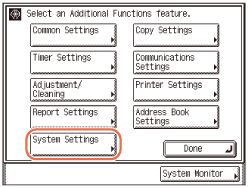
2
Press [ ] or [
 ] until [Display Dept. ID/User Name] appears → press [Display Dept. ID/User Name].
] or [] until [Display Dept. ID/User Name] appears → press [Display Dept. ID/User Name].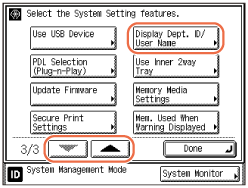
3
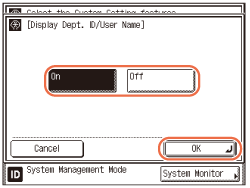
Select [On] or [Off] → press [OK].
|
|
[On]:
|
The Department ID or the user name is displayed at the lower left corner of the touch panel display.
|
|
[Off]:
|
The Department ID or the user name is not displayed at the lower left corner of the touch panel display.
|
4
Press  (Reset) to return to the top screen.
(Reset) to return to the top screen.