Setting Startup Time
If you connect the machine to a switching hub, it may not be able to connect to a network even though your network settings are set correctly.
This occurs because the spanning tree process performed between switching hubs prevents them from communicating with each other immediately after the machine connects to a switching hub.
In this case, use the procedure below to delay the start of communication.
|
IMPORTANT
|
|
Changes made to Startup Time Settings become effective when the machine is restarted. To restart the machine, turn it OFF, wait at least 10 seconds, and then turn it ON. For instructions on how to turn the machine ON and OFF, see Chapter 2, “Before You Start Using the Machine,” in the User’s Guide.
|
|
NOTE
|
|
The default setting is ‘0 sec(s)’.
|
1
Press  (Additional Functions) → [System Settings] → [Network Settings].
(Additional Functions) → [System Settings] → [Network Settings].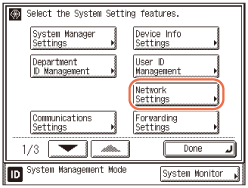
2
Press [ ] or [
 ] until [Startup Time Settings] appears → press [Startup Time Settings].
] or [] until [Startup Time Settings] appears → press [Startup Time Settings].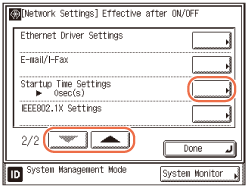
3
Set the time period required to delay the startup of network communications for the machine → press [OK].
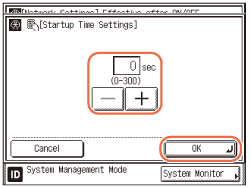
Use [-] or [+] to set the time period.
NOTE:
You can also enter values using  -
-  (numeric keys).
- (numeric keys).4
Restart the machine.
Turn OFF the machine, wait at least 10 seconds, and then turn it ON.