
Canceling Print Jobs
You can cancel print jobs from the Printer Status Window.
1
Select the machine by clicking  in the system tray.
in the system tray.
 |
The Printer Status Window is displayed.
|
2
Cancel the print job.
 To cancel a print job that is currently printing
Click  .
.
.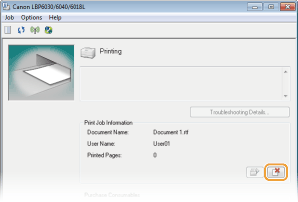
 Printing of the current document is canceled.
 To cancel a print job that is waiting
|
1
|
Select [Job]
 [Job Status]. [Job Status].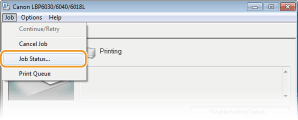 |
|
2
|
Select the document that you want to cancel, and click [Delete].
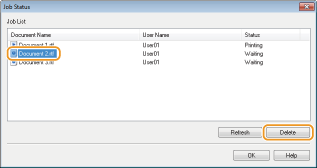 This screen displays up to five documents.
|
|
3
|
Click [OK].
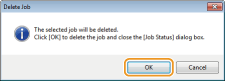 Printing of the selected document is canceled. Printing of the selected document is canceled. |
 |
|
Several pages may be output after you cancel printing.
|
|
TIPS
|
Canceling from the Remote UI (LBP6030w)You can cancel printing from the [Job Status] page on the Remote UI. Checking the Current Status of Print Documents
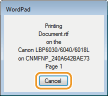
Canceling from an applicationOn some applications, a screen like the one shown below is displayed during printing. You can cancel printing by clicking [Cancel].
 |