Collating Printouts by Page
 |
When printing copies of multi-page documents, you can use the collate function to print complete sets in sequential page order. This function is useful when preparing handouts for meetings or presentations.
|
[Basic Settings] tab  Select [Collate] or [Group] in [Finishing] [OK]
Select [Collate] or [Group] in [Finishing] [OK]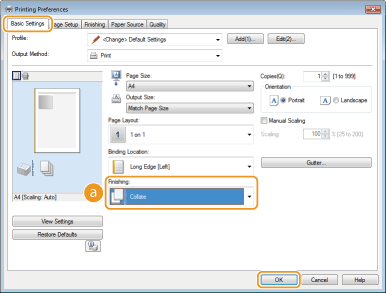
 [Finishing]
Specify the sorting method of the printouts when printing multiple-page documents.
|
[Collate]
|
The printouts are grouped into complete sets in sequential page order. For example, if you are printing three copies of a four-page document, the printouts will be arranged in the following page order: 1, 2, 3, 4, 1, 2, 3, 4, 1, 2, 3, 4.
 |
|
[Group]
|
The printouts are not collated. For example, if you are printing three copies of a four-page document, the printouts will be arranged in the following page order: 1, 1, 1, 2, 2, 2, 3, 3, 3, 4, 4, 4.
 |

If you select [Off], whether the printouts are collated or not depends on the setting made in the application.