
Saving Toner
 |
You can set the printer driver to print documents using less toner.
 |
|
|
|
When the save toner setting is enabled, fine lines and sections with lighter density may be less sharp that normal.
|
[Quality] tab  Select the document type in [Objective] Click [Advanced Settings] Select [Toner Save] in the [Advanced Settings] screen Select [On] from the drop-down list [OK] [OK]
Select the document type in [Objective] Click [Advanced Settings] Select [Toner Save] in the [Advanced Settings] screen Select [On] from the drop-down list [OK] [OK]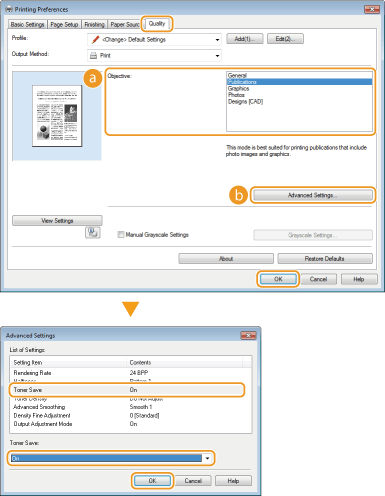
 [Objective] Printing According to the Document Type
Selects the document type for which you want to enable the save toner setting.
 [Advanced Settings]
Displays a screen with a list of advanced settings. Click [Toner Save] and select [On] from the drop-down list at the bottom of the screen.

You can specify whether to enable the save toner setting for each document type. Specify the save toner setting for each document type listed in [Objective].
In the [Advanced Settings] screen, you can specify various print settings other than [Toner Save] settings. For more information about the settings, click [Help] on the printer driver screen.