Remove the USB Memory Device
IMPORTANT |
When removing USB memory devicesAlways use the following procedure when removing USB memory devices. Using other methods to remove USB memory devices may result in damage to the device and the printer. |
1
Display the "USB Direct Print Mode Screen."
When other screens are displayed, press [  ] (
] ( Back) or [
  ] (
] ( Application) until the "USB Direct Print Mode Screen" is displayed.
] (Back) or [ ] (Application) until the "USB Direct Print Mode Screen" is displayed.2
Select [<Remove USB Memory>] with [ ] and [
 ], and then press [OK].
] and [], and then press [OK].
3
Select [Yes] with [] and [], and then press [OK].
] and [], and then press [OK].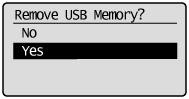
4
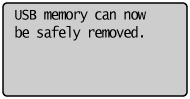
When the following message is displayed, remove the USB memory device from the printer.
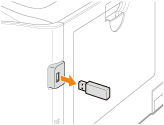
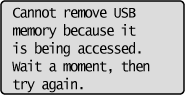
If an error message is displayed, wait a few seconds before starting the removal procedure again from the beginning.