Installing User's Guide
Install the User's Guide on your computer by using the Instruction Manual DVD-ROM that comes with the machine.
1
Insert the Instruction Manual DVD-ROM into the drive on the computer.
2
Select the language, and click [Next].
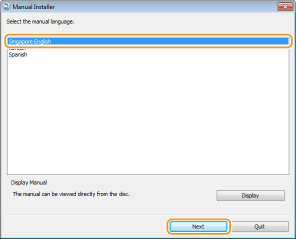

If the above screen is not displayed Displaying the Setup Screen of Instruction Manual DVD-ROM
If [AutoPlay] is displayed, click [Run Maninst.exe].
3
Follow the on-screen instructions to install the manual.
Viewing the User's Guide
Double-click the shortcut icon of the User's Guide on the desktop.

 |
If a security warning message appearsClick [Allow blocked content].
 |
|
TIPS for Viewing the User's Guide Directly from the DVD-ROM
|
||||
|