
Logging on to the Machine
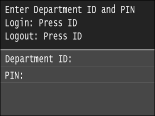
If Department ID Management is enabled or System Manager IDs are enabled, you must log on before using the machine. When the logon screen appears, use the procedure below to enter the department ID and PIN.
|
|
|
The factory default settings of the System Management ID and PIN are both "7654321." Setting the System Manager ID
|
1
Enter an ID.
|
1
|
Tap <Department ID> or <System Manager ID>.
|
|
2
|
Enter an ID using the numeric keys, and tap <Apply>.
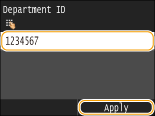 If no PIN is registered, proceed to step 3.
|
2
Enter the PIN.
|
1
|
Tap <PIN>.
|
|
2
|
Enter an ID using the numeric keys, and tap <Apply>.
|
3
Press  .
.
.The logon screen will be changed to the Home screen.
After you finish using the machine, press again to display the logon screen.
again to display the logon screen.