
Specifying Paper Size and Type in the Paper Drawer
|
|
|
To specify a custom paper size, you need to register that size before hand. Registering a Custom Paper Size
|
1
Press  and tap <Paper Settings>.
and tap <Paper Settings>.
2
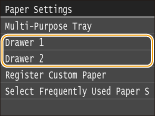
Tap <Drawer 1> or <Drawer 2>.
<Drawer 2> is displayed only when the optional paper feeder (drawer 2) is installed.
3
Select the paper size.
If the loaded paper size is not displayed, tap <Other Sizes>.

4
Select the paper type.
