Platen Glass
Regularly wipe off the dust from the platen glass and the underside of the feeder to prevent smudges to be printed on documents or printouts.
1
Turn OFF the machine, and unplug the power cord from the AC power outlet.
When you turn OFF the machine, data that is waiting to be printed is deleted. Fax documents that were received by using the Memory Reception function, faxes that are waiting to be sent, and reports that are automatically printed after sending and receiving faxes are not deleted.
2
Open the feeder.
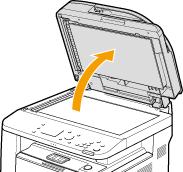
3
Clean the platen glass and the underside of the feeder.
Clean the areas with a cloth dampened with water. Then, wipe the area with a soft, dry cloth.
In addition to the platen glass and underside of the feeder, make sure to clean and wipe the white strip of plate ( ) and the surface of the transparent plastic part (
 ), too.
) and the surface of the transparent plastic part (), too.

When wiping the transparent plastic part (), take care not to bend the plastic.
), take care not to bend the plastic. If the problem persists
Remove the transparent plastic part () and wipe it.
) and wipe it.|
1
|
Hold the tabs (
 ) at both ends of the transparent plastic part, and remove the plastic part by gently lifting the rearward end first. ) at both ends of the transparent plastic part, and remove the plastic part by gently lifting the rearward end first.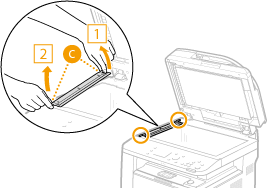 The plastic part (
) is rather damageable. When removing it, be careful not to bend it. |
|
2
|
Wipe the scanning area (
 ). ). |
|
3
|
Wipe the back side of the transparent plastic part.
 |
|
4
|
Wait for the plastic part to dry completely.
|
|
5
|
Place the transparent plastic part back into position.
Make sure of the proper orientation, then hold the tabs and place the plastic part back into position by gently lowering the frontward end first.
|
4
Wait for the cleaned area to dry completely.
5
Gently close the feeder.
6
Reconnect the power cord and turn ON the machine.