LDAP servera autentifikācija
Ja jūsu sistēmā ir instalēts LDAP serveris, varat nodrošināt, ka sūtīšanas funkcijas izmantošanas laikā tiek veikta LDAP servera autentifikācija. Šādi varat novērst neautorizētu trešo personu lietošanu un informācijas izpaušanu. Ja ir aktivizēti autorizācijas iestatījumi, faksa vai skenēšanas funkciju lietošanas laikā tiek parādīts autorizētas sūtīšanas ekrāns, un darbību var turpināt tikai tad, ja LDAP serveris to ir pareizi autorizējis. Lai konfigurētu LDAP servera autentifikāciju, izmantojiet šeit aprakstītos iestatījumus. Papildinformāciju par autentifikācijai izmantojamā servera reģistrēšanu skatiet sadaļā LDAP serveru reģistrēšana.
1
Atveriet utilītprogrammu Remote UI (Attālais lietotāja interfeiss) un piesakieties sistēmas pārvaldnieka režīmā. Remote UI (Attālais lietotāja interfeiss) palaišana
2
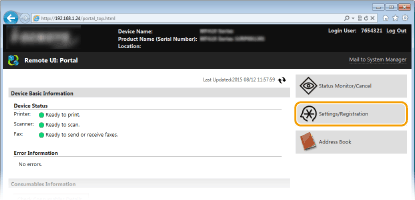
Noklikšķiniet uz [Settings/Registration].
3
Noklikšķiniet uz [Security Settings]  [Authentication Settings for Send Function].
[Authentication Settings for Send Function].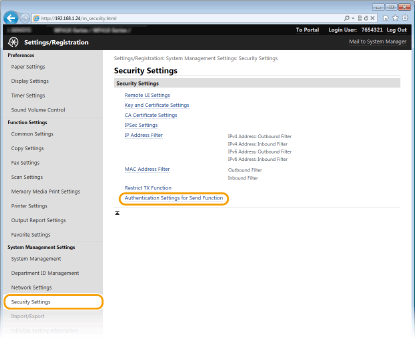
4
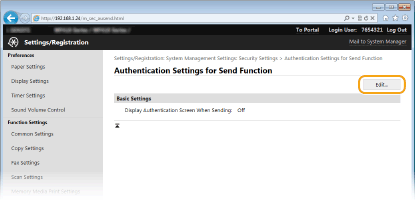
Noklikšķiniet uz [Edit].
5
Atzīmējiet izvēles rūtiņu [Display Authentication Screen When Sending Operation Starts] un izvēlieties, vai atteikšanās laikā ir jārāda apstiprinājuma ekrāns.
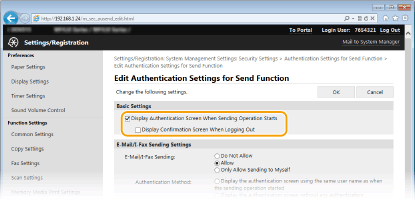
[Display Authentication Screen When Sending Operation Starts]
Atzīmējiet šo izvēles rūtiņu, lai faksa vai skenēšanas funkciju izmantošanas laikā parādītu autorizētas sūtīšanas pieteikšanās ekrānu (LDAP servera autentifikācija).
Atzīmējiet šo izvēles rūtiņu, lai faksa vai skenēšanas funkciju izmantošanas laikā parādītu autorizētas sūtīšanas pieteikšanās ekrānu (LDAP servera autentifikācija).
[Display Confirmation Screen When Logging Out]
Atzīmējiet izvēles rūtiņu, lai parādītu ekrānu, kurā pēc izvēles varat atteikties, ja esat pieteicies gan autorizētajā sūtīšanā, gan nodaļas ID pārvaldībā. Ja notīrāt šo izvēles rūtiņu, tad atteikšanās laikā jums netiek parādīts izvēles ekrāns, un atteikšanās notiek gan no autorizētās sūtīšanas, gan no nodaļas ID pārvaldības.
Atzīmējiet izvēles rūtiņu, lai parādītu ekrānu, kurā pēc izvēles varat atteikties, ja esat pieteicies gan autorizētajā sūtīšanā, gan nodaļas ID pārvaldībā. Ja notīrāt šo izvēles rūtiņu, tad atteikšanās laikā jums netiek parādīts izvēles ekrāns, un atteikšanās notiek gan no autorizētās sūtīšanas, gan no nodaļas ID pārvaldības.
6
Konfigurējiet e-pasta/I-Fax dokumentu sūtīšanas iestatījumus.
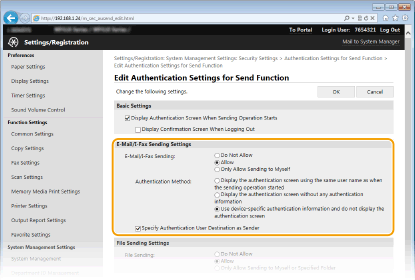
[E-Mail/I-Fax Sending]
Izvēlieties, vai atļaut e-pastu un I-Fax dokumentu sūtīšanu.
Izvēlieties, vai atļaut e-pastu un I-Fax dokumentu sūtīšanu.
|
[Do Not Allow]
|
Bloķē e-pasta ziņojumu un I-Fax dokumentu sūtīšanu. Skenēšanas funkcijā vairs nevar izmantot vienumus <E-pasts> un <I-fakss>.
|
|
[Allow]
|
E-pastu un I-Fax dokumentu sūtīšana nav bloķēta.
|
|
[Only Allow Sending to Myself]
|
Bloķē visu e-pasta ziņojumu un I-Fax dokumentu sūtīšanu, izņemot tos, kas ir lietotājiem ar autorizētām e-pasta adresēm. Autorizēto lietotāju e-pasta adresēm ir jābūt reģistrētām LDAP serverī.
|
[Authentication Method]
Ja izvēlēta vērtība [Allow] vai [Only Allow Sending to Myself] sadaļā [E-Mail/I-Fax Sending], var norādīt, vai SMTP serverī e-pasta sūtīšanas laikā parādīt autentificēšanas ekrānu.
Ja izvēlēta vērtība [Allow] vai [Only Allow Sending to Myself] sadaļā [E-Mail/I-Fax Sending], var norādīt, vai SMTP serverī e-pasta sūtīšanas laikā parādīt autentificēšanas ekrānu.
|
[Display the authentication screen using the same user name as when the sending operation started]
|
Parāda autentificēšanas ekrānu, kurā redzams tas pats lietotājvārds un parole, ko ievadījāt autorizētas sūtīšanas pieteikšanās ekrānā.
|
|
[Display the authentication screen without any authentication information]
|
Parāda autentificēšanas ekrānu, kur lietotājvārda un paroles lauki ir tukši.
|
|
[Use device-specific authentication information and do not display the authentication screen]
|
E-pasta ziņojumu vai I-Fax dokumentu sūtīšanas laikā autentificēšanas ekrāns netiek parādīts. Autentificēšana SMTP serverī tiek veikta, izmantojot lietotājvārdu un paroli, kas iestatīti sadaļā [E-Mail/I-Fax Settings] E-pasta/I-Fax sakaru iestatījumu konfigurēšana.
|
[Specify Authentication User Destination as Sender]
Atzīmējiet izvēles rūtiņu, kad kā sūtītājs tiks iestatīta autorizēta lietotāja e-pasta adrese. Autorizētu lietotāju e-pasta adresēm ir jābūt reģistrētām LDAP serverī. Ja šo izvēles rūtiņu notīrāt, kā sūtītājs tiek iestatīta tā e-pasta adrese, kas iestatīta sadaļā [E-Mail/I-Fax Settings].
Atzīmējiet izvēles rūtiņu, kad kā sūtītājs tiks iestatīta autorizēta lietotāja e-pasta adrese. Autorizētu lietotāju e-pasta adresēm ir jābūt reģistrētām LDAP serverī. Ja šo izvēles rūtiņu notīrāt, kā sūtītājs tiek iestatīta tā e-pasta adrese, kas iestatīta sadaļā [E-Mail/I-Fax Settings].
7
Konfigurējiet failu sūtīšanas iestatījumus (saglabāšanai koplietojamās mapēs vai FTP serverī).
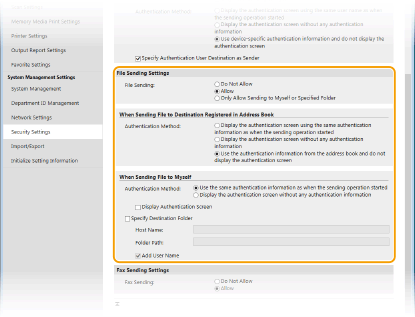
[File Sending]
Izvēlieties, vai ļaut saglabāšanu koplietojamās mapēs un FTP serveros.
Izvēlieties, vai ļaut saglabāšanu koplietojamās mapēs un FTP serveros.
|
[Do Not Allow]
|
Bloķē saglabāšanu koplietojamās mapēs un FTP serveros. Skenēšanas funkcijā vairs nevar izmantot vienumu <Fails>.
|
|
[Allow]
|
Saglabāšana koplietojamās mapēs un FTP serveros nav bloķēta.
|
|
[Only Allow Sending to Myself or Specified Folder]
|
Bloķē jebkādu saglabāšanu visās koplietotajās mapēs un FTP serveros, izņemot norādītās mapes. Dati tiek saglabāti LDAP serverī reģistrētās mapēs vai mapē, kas norādīta sadaļā [Specify Destination Folder].
|
 Ja vienumam [File Sending] ir norādīta vērtība [Allow]
[Authentication Method]
Atļauj norādīt, vai serverim sūtīšanas laikā tiek rādīts autentificēšanas ekrāns.
Atļauj norādīt, vai serverim sūtīšanas laikā tiek rādīts autentificēšanas ekrāns.
|
[Display the authentication screen using the same authentication information as when the sending operation started]
|
Parāda autentificēšanas ekrānu, kurā redzams tas pats lietotājvārds un parole, ko ievadījāt autorizētas sūtīšanas pieteikšanās ekrānā.
|
|
[Display the authentication screen without any authentication information]
|
Parāda autentificēšanas ekrānu, kur lietotājvārda un paroles lauki ir tukši.
|
|
[Use the authentication information from the address book and do not display the authentication screen]
|
Sūtīšanas laikā autentificēšanas ekrāns netiek parādīts. Autentificēšana serverī tiek veikta, izmantojot adrešu grāmatā iestatīto lietotājvārdu un paroli.
|
Ja vienumam [File Sending] ir norādīta vērtība [Only Allow Sending to Myself or Specified Folder]
[Authentication Method]
Atļauj norādīt, vai serverim sūtīšanas laikā tiek rādīts autentificēšanas ekrāns.
Atļauj norādīt, vai serverim sūtīšanas laikā tiek rādīts autentificēšanas ekrāns.
|
[Use the same authentication information as when the sending operation started]
|
Serverī izpilda autorizēšanu, izmantojot autorizētas sūtīšanas pieteikšanās ekrānā ievadīto lietotājvārdu un paroli. Ja atzīmējat izvēles rūtiņu [Display Authentication Screen], tiek parādīts autentificēšanas ekrāns, kurā jau ir ievadīts šis lietotājvārds un parole, kad sūtāt datus.
|
|
[Display the authentication screen without any authentication information]
|
Parāda autentificēšanas ekrānu, kur lietotājvārda un paroles lauki ir tukši.
|
[Specify Destination Folder]
Ja atzīmējat šo izvēles rūtiņu, varat norādīt mapi, kur datus saglabāt. Ja šī izvēles rūtiņa nav atzīmēta, saglabāšanas mērķis tiek iestatīts atkarībā no autorizētā lietotāja informācijas, kas reģistrēta LDAP serverī.
Ja atzīmējat šo izvēles rūtiņu, varat norādīt mapi, kur datus saglabāt. Ja šī izvēles rūtiņa nav atzīmēta, saglabāšanas mērķis tiek iestatīts atkarībā no autorizētā lietotāja informācijas, kas reģistrēta LDAP serverī.
|
[Host Name]
|
Ievadiet līdz 120 rakstzīmju garu koplietotās mapes vai FTP servera resursdatora nosaukumu.
|
|
[Folder Path]
|
Ievadiet līdz 120 rakstzīmju garu (neskaitot resursdatora nosaukumu) ceļa nosaukumu saglabāšanas mērķa mapei. Ja ir atzīmēta izvēles rūtiņa [Add User Name], tiek pievienots LDAP autentificēšanai izmantotais lietotājvārds un ceļš.
|
8
Konfigurējiet faksa dokumentu sūtīšanas iestatījumus.
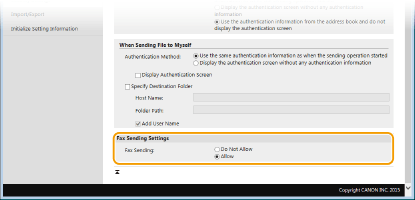
[Fax Sending]
Izvēlieties, vai atļaut faksu sūtīšanu.
Izvēlieties, vai atļaut faksu sūtīšanu.
|
[Do Not Allow]
|
Bloķē faksu sūtīšanu. Faksa funkciju vairs nevar lietot.
|
|
[Allow]
|
Faksu sūtīšana ir bloķēta.
|
9
Noklikšķiniet uz [OK].