Fixing the Paper Size and Type to Use with the Multi-Purpose Tray
If you always use the same paper size and type with the multi-purpose tray, it is recommended that you fix the paper size and type settings for the multi-purpose tray. This is convenient because you can save the time and labor to make settings each time you load paper in the multi-purpose tray.
1
Press  (Settings/Registration).
(Settings/Registration).2
Press <Preferences>  <Paper Settings> <Multi-Purpose Tray Defaults>.
<Paper Settings> <Multi-Purpose Tray Defaults>.3
Press <Use Preset> <Register>.
<Register>.4
Select the paper size.
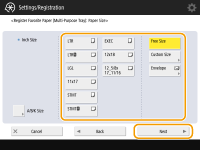 | 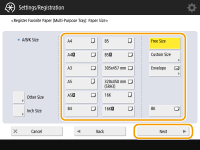 |
120 V machine | 230 V machine |
 When registering standard size paper
1 | Select the standard size paper. |
2 | Press <Next>. |
When registering custom size paper
1 | Press <Custom Size>.  You can specify the paper size as <Free Size>, which eliminates the need to enter the paper size setting. Specify <Free Size> when you load paper of unknown size to use for copying or when the paper size is already registered in the printer driver. |
2 | Specify the length of the <X> side and <Y> side. |
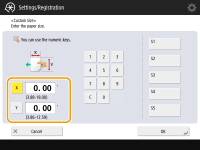 | 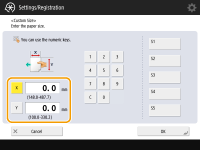 | |
120 V machine | 230 V machine |
Press <X> or <Y> to enter the length of each side using the numeric keys.  If you register the paper size you use frequently on buttons <S1> to <S5>, you can call them up with one touch. Registering Free Size Paper (Custom Size Paper) | |
3 | Press <OK> <Next>. |
When registering envelopes
1 | Press <Envelope>. |
2 | Select the orientation and type of envelopes. 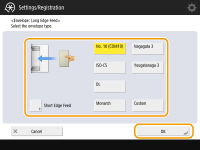 If you changed the placement of the envelopes, press <Short Edge Feed> or <Long Edge Feed>, and select the envelope type. If you selected vertical placement for Nagagata 3, press <Next>, and specify the flap length. To register a custom size envelope, press <Custom> <Next> and press <X> or <Y> to specify the side, then use the numeric keys to enter the length of the specified side. When using Kakugata 2, place it horizontally. |
3 | Press <OK> <Next>. |
When registering other size paper (for the 230 V machine only)
1 | Press <Other Size>. |
2 | Select the paper size. 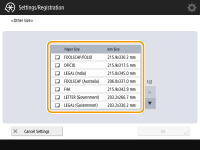 For information on the paper sizes displayed when <Other Size> is pressed, see Available Paper. |
3 | Press <OK>. |
5
Select the paper type and press <OK>.
6
Press <OK>.
7
Press <Close>.