
Adjusting the Color
| Adjust the density of yellow, magenta, cyan, and black separately. You can also specify the vividness and tone to perform fine adjustment for the color. |
1
Place the original. Placing Originals
2
Press <Copy>. <Main Menu> Screen
3
Press <Options> on the Copy Basic Features screen. Copy Basic Features Screen
4
Press <Color Balance>.
5
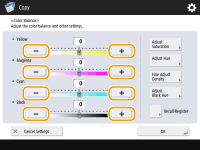
Press <-> or <+> for each color to adjust the color balance.
6
Perform other adjustment.
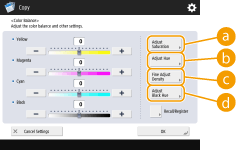
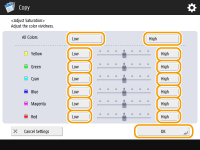
 <Adjust Saturation>
To set the saturation for all colors, use the <Low> or <High> button for <All Colors>. To set each color separately, use the <Low> or <High> button for each color. When adjustment is complete, press <OK>.
 <Adjust Hue>
To set the hue for all colors, use the  or
or  button for <All Colors>. To set each color separately, use the buttons to the left and right of each color. When adjustment is complete, press <OK>.
or button for <All Colors>. To set each color separately, use the buttons to the left and right of each color. When adjustment is complete, press <OK>.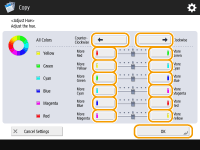
 <Fine Adjust Density>
Select a color and adjust its density level by its density area using the <-> or <+> button. When adjustment is complete, press <OK>.
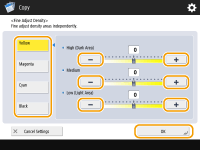
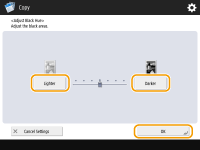
 <Adjust Black Hue>
Adjust towards the side of <Lighter> to prevent the image from becoming over-darkened. Adjust towards the side of <Darker> if text and images are too light. When adjustment is complete, press <OK>.
7
Press <OK>  <Close>.
<Close>.8
Press  (Start).
(Start).Copying starts.
TIPS |
You can register up to four settings after adjustment. After adjusting the color, press <Recall/Register> select a button from <C1> to <C4> press <Register> <Yes> <OK>.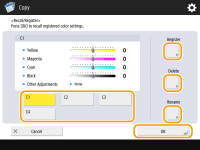  To recall registered settings, press <Recall/Register>, select a button, and press <OK>. You can change the button names of <C1> to <C4>. Select the button to change, press <Rename>, and enter a new name. To delete registered settings, select the button press <Delete> <Yes>. |