Changing the Browser Engine
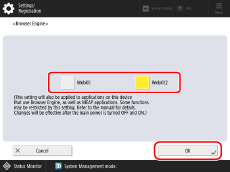
For models that support both WebKit and WebKit2 browser engines, you can select the browser engine to use.
NOTE |
When the browser engine is changed, various data are transferred as follows: Cookies and Favorites information will be retained. Local storage data will not be retained. If you revert to the previous browser engine, you can access the previously saved data. The user agent settings will be reset to their default values. If the setting value is appended, only the appended string is retained. Depending on the type of external authentication server used for user authentication, the browser engine may need to be set to [WebKit2]. For details, see "User's Guide." |
1.
Press  (Settings/Registration).
(Settings/Registration).2.
Press [Function Settings] → [Web Access] → [Settings].
3.
Press [Browser Engine].
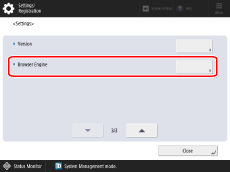
4.
Select the browser engine to use →press [OK].
5.
Restart the machine.