Displaying Mixed HTTPS/HTTP Pages
You can enable display of mixed HTTPS/HTTP pages.
1.
Press  (Settings/Registration).
(Settings/Registration).2.
Press [Function Settings] → [Web Access] → [Settings].
3.
Press [Security] → select [On] for [Display Mixed HTTPS/HTTP Pg] → press [OK].
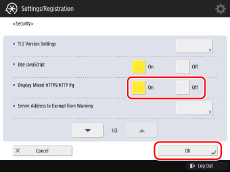
If you select [Off], only content specified with HTTPS appears for mixed HTTPS/HTTP pages.
NOTE |
If the browser engine is set to [WebKit2], changing the setting will restart the browser, and the following processes are performed. Note that the browser engine cannot be changed depending on your model. Cookies are deleted Caches are deleted [Back] and [Forward] logs are deleted The displayed page is changed to a blank page |