Setting Device Information Notification Restrictions
You can restrict the Web Access from appending device information to the HTML request header.
IMPORTANT |
Even when this restriction is set to [On], the device information is displayed when communicating with addresses set as trusted servers. |
1.
Press  (Settings/Registration).
(Settings/Registration).2.
Press [Function Settings] → [Web Access] → [Settings].
3.
Press [Security].
4.
Select [On] for [Restrict Share Device Information] → press [OK].
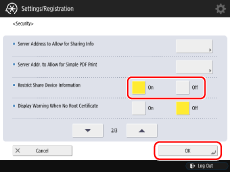
The device information is only appended when processing requests for the addresses set in [Server Address to Allow for Sharing Info].
If you select [Off], the device information is appended when processing requests for all addresses.
NOTE |
If [Restrict Share Device Information] is set to [On] and nothing is set in [Server Address to Allow for Sharing Info], device information is not appended when processing requests for any address. |