Displaying a Warning Message If the Certificate CN Does Not Match
You can set whether to display a warning message if the certificate CN does not match.
1.
Press  (Settings/Registration).
(Settings/Registration).2.
Press [Function Settings] → [Web Access] → [Settings].
3.
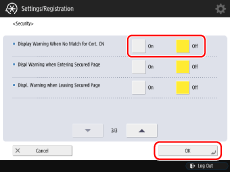
Press [Security] → select [On] or [Off] for [Display Warning When No Match for Cert. CN] → [OK].
NOTE |
When you set [Display Warning When No Match for Cert. CN] to [On], and [Server Address to Exempt from Warning] is not set, the warning message is always displayed. The warning message will not be displayed in the following cases: When communicating with the address set in [Server Address to Exempt from Warning] When [Display Warning When No Match for Cert. CN] is set to [Off] |