Setting the TLS Version
You can set the TLS version to use for communication with external servers.
1.
Press  (Settings/Registration).
(Settings/Registration).2.
Press [Function Settings] → [Web Access] → [Settings].
3.
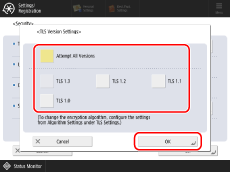
Press [Security] → [TLS Version Settings].
4.
Select the TLS version or [Attempt All Versions] → press [OK].
NOTE |
The versions subject to [Attempt All Versions] depend on the range specified in [Specify Allowed Versions] in [TLS Settings] on the machine. The upper limit and lower limit of TLS versions can be set in [Specify Allowed Versions] in [TLS Settings] on the machine. For information on changing the TLS version of the machine, see “User's Guide.” If the browser engine is set to [WebKit2], changing the setting will restart the browser, and the following processes are performed. Note that the browser engine cannot be changed depending on your model. Cookies are deleted Caches are deleted [Back] and [Forward] logs are deleted The displayed page is changed to a blank page |