Viewing a PDF File
You can view a linked PDF file.
1.
Press the link to the PDF file on the Web page.
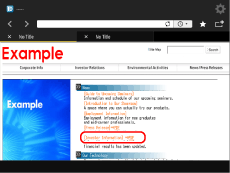
You cannot specify multiple PDF files at the same time. Also, PDF files cannot be open in more than two windows.
If a password is set for the specified PDF file, enter the password.
2.
Press [View] → [OK].
The selected PDF file is displayed.
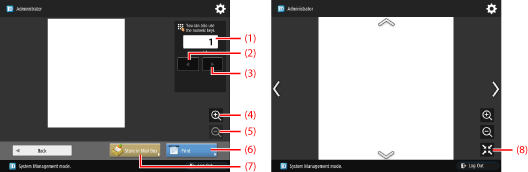
The buttons on the PDF File Display screen are as follows:
(1) | Page Number: | Displays the current number and total number of pages of the PDF file. |
(2) | Back: | Returns to the previous page. |
(3) | Next: | Proceeds to the next page. |
(4) | Enlarge: | Enlarges the display of the PDF file. |
(5) | Reduce: | Reduces the display of the PDF file. |
(6) | Print: | Prints the PDF file. (See "Printing a PDF File.") |
(7) | Store in User Inbox: | Saves the file in a Mail Box. (See "Saving a PDF File in a Mail Box.") |
(8) | Fit Web Page Into Screen Size: | Select whether to display the content automatically so that it fits within the width of the screen. |
If you press 'Page Number', you can specify the desired page number. To proceed to a specific page, enter the desired page number using  -
-  (numeric keys) → press [OK].
- (numeric keys) → press [OK].NOTE |
Depending on the version of the PDF file, there may be cases in which the PDF file cannot be properly displayed. |