Specifying the Warning Message Displayed When Entering Secured Web Page
You can set whether to display a warning message when you enter the secured Web page.
1.
Press  (Settings/Registration).
(Settings/Registration).2.
Press [Function Settings] → [Web Access] → [Settings].
3.
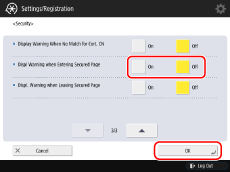
Press [Security] → select [On] or [Off] for [Displ Warning when Entering Secured Page] → [OK].