Settings Preview
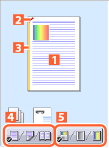
The current settings are shown in the preview on the left side of the printer driver screen. You can also set basic print functions by clicking on the preview.
1.
Display the [Basic Settings], [Page Setup], [Finishing], or [Paper Source] tab.
2.
Click the page image or buttons in the preview.
You can configure the following settings.
 |
|
 N on 1 printing
 Stapling
 Binding location
 Switch between 1-sided printing and 2-sided printing
 Switch between color and black and white printing (color printers only)
References
The displayed preview and available settings may differ from those described, depending on the printer model and installed options.
Some print settings may not be correctly displayed in the preview.