Universal LIPS4 Printer Driver and Configuration Profiles
The Canon Universal LIPS4 printer driver is a generic printer driver provided with all the print setting functions for a variety of supported printer models, and can be used in common with them. Although up till now printer drivers have been provided individually for each printer model, by simply installing only the Canon Universal LIPS4 Printer Driver, you can configure driver settings for a variety of printer models by switching configuration profiles.
What Is a Configuration Profile?
A "configuration profile" is a configuration information file for configuring the Canon Universal LIPS4 printer driver, which is provided with all print setting functions, with settings suitable for the device you are using.
Satera LBP, iR-ADV, iR-ADV PRO, imagePRESS, a base configuration, and an Anyplace Print "configuration profile" are provided in advance, and by switching between these you can realize the print setting functions with the characteristics of each printer series. Although up till now printer drivers were prepared separately for each printer model, once you install the Canon Universal LIPS4 printer driver, if you changed the printer model you are using, you can use the printer driver by simply switching the "configuration profile."
Previous Printer Drivers
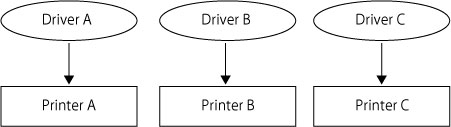
Canon Universal LIPS4 Printer Driver
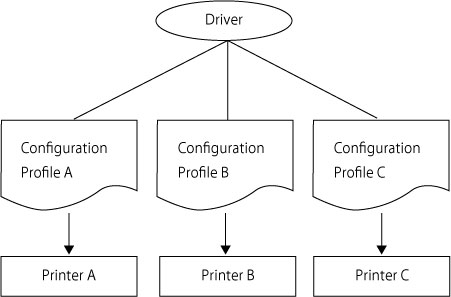
Configuration profile settings
If you are using a printer connected via a TCP/IP network, when installing the Canon Universal LIPS4 printer driver, the configuration profile and settings in the [Device Settings] tab are set automatically. Normally, you can use the printer as is without changing the settings in the [Device Settings] tab.
If you change the printer to a different printer model or switch ports after installing the driver, be sure to perform an automatic update on the configuration profile.
If you cannot acquire configuration information, set the configuration profile and [Device Settings] tab settings manually while referring to "Printer Status Settings."
If you change the printer to a different printer model or switch ports after installing the driver, be sure to perform an automatic update on the configuration profile.
If you cannot acquire configuration information, set the configuration profile and [Device Settings] tab settings manually while referring to "Printer Status Settings."
Exporting/Importing a Configuration Profile
You can export and import configuration profiles.
By creating and distributing configuration profiles for each printer model or operating method, you can alleviate the time and effort of configuring settings for each user.
Also, if you cannot acquire the configuration information, by importing a configuration profile exported in an environment in which the configuration information could be acquired, you can configure the same settings.
By creating and distributing configuration profiles for each printer model or operating method, you can alleviate the time and effort of configuring settings for each user.
Also, if you cannot acquire the configuration information, by importing a configuration profile exported in an environment in which the configuration information could be acquired, you can configure the same settings.