Fixing the Paper Size and Type to Use with the Multi-Purpose Tray
If you always use the same paper size and type with the multi-purpose tray, it is recommended that you fix the paper size and type settings for the multi-purpose tray. This is convenient because you can save the time and labor to make settings each time you load paper in the multi-purpose tray.
1
Press  .
.
.2
Press <Preferences>  <Paper Settings> <Multi-Purpose Tray Defaults>.
<Paper Settings> <Multi-Purpose Tray Defaults>.3
Press <Use Preset> <Register>.
<Register>.4
Select the paper size.
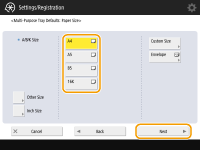
 When registering standard size paper
|
1
|
Select the standard size paper.
|
|
2
|
Press <Next>.
|
When registering custom size paper
|
1
|
Press <Custom Size>.
|
|
2
|
Specify the length of the <X> side and <Y> side.
|
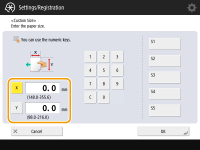
|
Press <X> or <Y> to enter the length of each side using the numeric keys.
 If you register the paper size you use frequently on buttons <S1> to <S5>, you can call them up with one touch. Registering Free Size Paper (Custom Size Paper)
|
|
|
3
|
Press <OK>
<Next>. |
When registering envelopes
|
1
|
Press <Envelope>.
|
|
2
|
Select the type of envelopes.
 To register a custom size envelope, press <Custom>
<Next> and press <X> or <Y> to specify the side, then use the numeric keys to enter the length of the specified side. |
|
3
|
Press <OK>
<Next>.Proceed to step 6.
|
When registering other size paper
|
1
|
Press <Other Size>.
|
|
2
|
Select the paper size.
  For information on the paper sizes displayed when <Other Size> is pressed, see Available Paper.
|
|
3
|
Press <OK>.
|
5
Select the paper type and press <OK>.
6
Press <OK>.
7
Press <Close>.