
Sending PC Faxes
|
|
|
When <Allow Fax Driver TX> is set to <Off> on the machine, you cannot send faxes from computers. Prohibiting PC Faxing
|
1
Open a document in an application and display the print dialog box.
How to display the print dialog box differs for each application. For more information, see the instruction manual for the application you are using.
2
Select the fax driver for this machine, and click [Print].
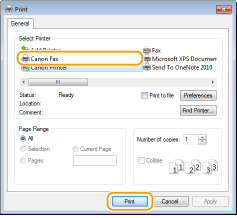

When sending from the Windows Store app in Windows 8/10/Server 2012
Display the charms on the right side of the screen and use the procedure shown below.
Windows 8/Server 2012
Tap or click [Devices] the fax driver for this machine [Print].
Tap or click [Devices]
the fax driver for this machine [Print].Windows 8.1/Server 2012 R2
Tap or click [Devices] [Print] the fax driver for this machine [Print].
Tap or click [Devices]
[Print] the fax driver for this machine [Print].Windows 10
Tap or click [Print] in the application menu the fax driver for this machine [Print].
the fax driver for this machine [Print].If you send faxes using this method, only a limited number of fax functions are available.
If the message [The printer requires your attention. Go to the desktop to take care of it.] is displayed, go to the desktop and proceed to step 3. This message appears when the machine is set to display the user name during sending a fax and similar instances.
3
Specify the destination.
 To specify only one destination
|
1
|
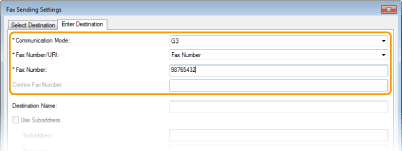
Click the [Enter Destination] tab.
|
|
2
|
Set the communication mode and fax number (or URI).
 |
To specify multiple destinations at once
|
1
|
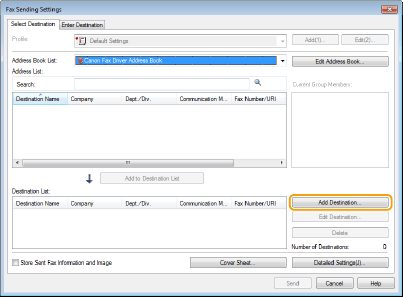
Click the [Select Destination] tab.
|
|
2
|
Click [Add Destination].
 |
|
3
|
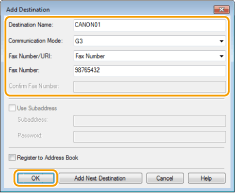
Set the communication mode and fax number (or URI), and click [OK].
|
 |
|
|
4
|
Repeat steps 2 and 3 to add concurrent destinations.
You can also add a destination by clicking [Add Next Destination] in step 3.
|
If you need to specify a number to dial an outside line, select [Detailed Settings] [Add Outside Dialing Prefix to G3/IP Fax Number] and enter the number in [Outside Dialing Prefix]. The specified number is added to the beginning of the fax number when the machine dials.
[Add Outside Dialing Prefix to G3/IP Fax Number] and enter the number in [Outside Dialing Prefix]. The specified number is added to the beginning of the fax number when the machine dials.To make it easier to specify destinations using the Address Book, see Using Registered Destinations.
Selecting [Store Sent Fax Information and Image] enables you to store the logs for sending documents and check detailed information of a sent document along with its image, including destinations and number of pages. For more information, click [Help] on the fax driver screen.
When the [Confirm Fax Number] or [Confirm URI] field is active, also enter the appropriate number in the field. The setting of whether to confirm entered numbers can be changed in the fax driver screen. For more information, click [Help] on the fax driver screen.
4
Attach a cover sheet to the document as necessary. Attaching Cover Sheets to PC Faxes
5
Click [Send] to send the document.