Deleting Registered Stamps
You can delete stamps that are newly registered or duplicated in Desktop Editor.
|
NOTE
|
|
You cannot delete the stamps that are automatically registered during installation.
|
1.
Click  for
for  (Stamp) on the ribbon, and select [Manage Stamps].
for (Stamp) on the ribbon, and select [Manage Stamps].Or, follow one of the steps described below.
Click  (Manage Stamps) on the ribbon
(Manage Stamps) on the ribbonClick  (Manage Stamps) on the ribbon
(Manage Stamps) on the ribbonSelect the [File] menu > [Settings/Management] > [Manage Stamps]
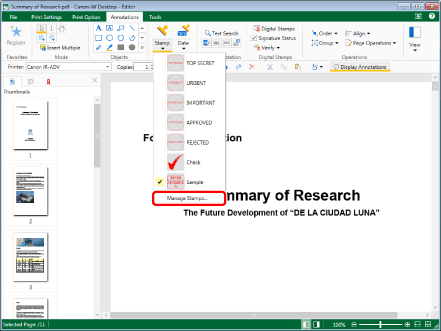
The [Manage Stamps] dialog box is displayed.
|
NOTE
|
|
If commands are not displayed on the ribbon of Desktop Editor, see the following to display them.
This operation can also be performed with the tool buttons on the toolbar. If tool buttons are not displayed in the toolbar of Desktop Editor, see the following to display them.
|
2.
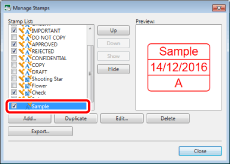
Select a stamp to delete from [Stamp List].
3.
Click [Delete].
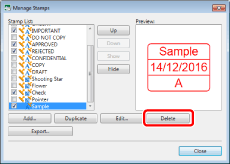
A confirmation message is displayed.
4.
Click [Yes].
The [Manage Stamps] dialog box is displayed again.
5.
Click [Close].